<?xml version="1.0" encoding="utf-8"?><feed xmlns="http://www.w3.org/2005/Atom" ><generator uri="https://jekyllrb.com/" version="3.10.0">Jekyll</generator><link href="https://mfkl.github.io/feed.xml" rel="self" type="application/atom+xml" /><link href="https://mfkl.github.io/" rel="alternate" type="text/html" /><updated>2026-02-11T18:40:36+00:00</updated><id>https://mfkl.github.io/feed.xml</id><title type="html">mfkl</title><subtitle>mfkl</subtitle><author><name>Martin Finkel</name></author><entry><title type="html">Writing a native VLC plugin in C#</title><link href="https://mfkl.github.io/2026/02/11/vlc-plugin-csharp.html" rel="alternate" type="text/html" title="Writing a native VLC plugin in C#" /><published>2026-02-11T00:00:00+00:00</published><updated>2026-02-11T00:00:00+00:00</updated><id>https://mfkl.github.io/2026/02/11/vlc-plugin-csharp</id><content type="html" xml:base="https://mfkl.github.io/2026/02/11/vlc-plugin-csharp.html"><![CDATA[<p>From a developer point of view, VLC has several integration points depending on what you are trying to achieve. They provide different levels of abstractions, capabilities and complexity.</p>

<p>The most common and straightforward way is the <a href="https://www.videolan.org/vlc/libvlc.html">LibVLC</a> API. It is the SDK used by most applications that embed VLC, and <a href="https://code.videolan.org/videolan/LibVLCSharp">LibVLCSharp</a> makes it available to .NET developers. If you need to play media in your app, this is the way to go.</p>

<p>Then there is the Lua scripting layer. VLC ships with Lua scripts for things like the <a href="https://code.videolan.org/videolan/vlc/-/blob/master/share/lua/intf/http.lua">HTTP interface</a>, playlist parsers and extensions. It is more limited than native code, but it is a dynamic scripting language that is easy to write and update. It is also, historically, the main approach for writing extensions to the main VLC desktop application.</p>

<p>And then there are native VLC plugins. These target <code class="language-plaintext highlighter-rouge">libvlccore</code> directly and provide the most capabilities: video filters, audio filters, demuxers, codecs, renderers, and more.</p>

<p>Unlike a LibVLC setup where the host app loads libvlc and calls into it, native plugins are automatically loaded and unloaded by the VLC core depending on what is needed. The core selects them based on capabilities and priorities.</p>

<p>These modules have traditionally been written in C or C++. More recently, there has been work on writing them <a href="https://code.videolan.org/videolan/vlc/-/blob/master/modules/logger/telegraf-rs/src/lib.rs">in Rust</a> as well, though that is also relatively new and limited to a few modules so far.</p>

<p>This got me thinking. What about C#?</p>

<h2 id="the-experiment">The experiment</h2>

<p>I had this idea over 6 years ago but never got around to it.</p>

<p>It is possible through the use of AOT (Ahead-Of-Time) compilation. For .NET developers not familiar with it: AOT compiles your C# code directly to native machine code at build time. No JIT, no runtime code generation, minimal runtime overhead. The CLR is still there under the hood (AOT does not remove it entirely), but what you get is a self-contained native binary with performance characteristics close to C/C++. In our case, that means a native DLL that VLC can load just like any other plugin.</p>

<p>I wanted to see if this was actually possible. Could we write a fully native VLC 4.x plugin in C#, have it loaded by VLC, process video frames, and render things on screen?</p>

<p>Turns out, yes. The result is <a href="https://github.com/mfkl/vlclr">VLCLR</a>, a framework for building VLC 4.x plugins in C# using Native AOT.</p>

<h2 id="what-it-looks-like">What it looks like</h2>

<p>Here is a simplified video filter plugin. The framework provides a base class and <a href="https://learn.microsoft.com/en-us/dotnet/csharp/roslyn-sdk/source-generators-overview">Roslyn source generators</a> handle all the entry point boilerplate:</p>

<div class="language-csharp highlighter-rouge"><div class="highlight"><pre class="highlight"><code><span class="p">[</span><span class="nf">VLCModule</span><span class="p">(</span><span class="s">"dotnet_overlay"</span><span class="p">)]</span>
<span class="p">[</span><span class="nf">VLCCapability</span><span class="p">(</span><span class="s">"video filter"</span><span class="p">)]</span>
<span class="p">[</span><span class="nf">VLCDescription</span><span class="p">(</span><span class="s">".NET Native AOT Video Filter Overlay"</span><span class="p">)]</span>
<span class="p">[</span><span class="nf">VLCConfig</span><span class="p">(</span><span class="s">"dotnet-overlay-opacity"</span><span class="p">,</span> <span class="n">VLCConfigType</span><span class="p">.</span><span class="n">Float</span><span class="p">,</span>
    <span class="n">Default</span> <span class="p">=</span> <span class="m">1.0f</span><span class="p">,</span> <span class="n">Min</span> <span class="p">=</span> <span class="m">0.0f</span><span class="p">,</span> <span class="n">Max</span> <span class="p">=</span> <span class="m">1.0f</span><span class="p">,</span>
    <span class="n">Description</span> <span class="p">=</span> <span class="s">"Overlay opacity"</span><span class="p">)]</span>
<span class="k">public</span> <span class="k">partial</span> <span class="k">class</span> <span class="nc">VideoOverlayFilter</span> <span class="p">:</span> <span class="n">VLCVideoFilterBase</span>
<span class="p">{</span>
    <span class="k">protected</span> <span class="k">override</span> <span class="kt">bool</span> <span class="nf">OnOpen</span><span class="p">(</span><span class="n">VLCFilterContext</span> <span class="n">context</span><span class="p">)</span>
    <span class="p">{</span>
        <span class="c1">// Initialize your filter</span>
        <span class="k">return</span> <span class="k">true</span><span class="p">;</span>
    <span class="p">}</span>

    <span class="k">protected</span> <span class="k">override</span> <span class="k">void</span> <span class="nf">ProcessFrame</span><span class="p">(</span><span class="n">VLCFrame</span> <span class="n">frame</span><span class="p">)</span>
    <span class="p">{</span>
        <span class="c1">// Access frame.Pixels, frame.Width, frame.Height</span>
        <span class="c1">// Modify the frame data directly</span>
    <span class="p">}</span>

    <span class="k">protected</span> <span class="k">override</span> <span class="k">void</span> <span class="nf">OnClose</span><span class="p">()</span>
    <span class="p">{</span>
        <span class="c1">// Clean up</span>
    <span class="p">}</span>
<span class="p">}</span>
</code></pre></div></div>

<p>No C code. No interop stubs. You decorate your class with a few attributes, override the methods you need, and the Roslyn source generator produces the <code class="language-plaintext highlighter-rouge">vlc_entry</code> function, the module descriptor, the config options registration, everything VLC needs to discover and load the plugin. Minimal setup, nice developer experience.</p>

<p>Under the hood, the framework provides native type definitions matching VLC 4.x C structures, base classes that handle instance management and callback marshaling, and imaging utilities for frame format conversion and compositing. The source generators inspect your class attributes and generate the exact binary layout VLC expects for module registration. This catches many registration issues at compile time rather than at runtime.</p>

<p>The key parts of the <code class="language-plaintext highlighter-rouge">.csproj</code> are what you would expect for a Native AOT library, plus the VLC-specific bits:</p>

<div class="language-xml highlighter-rouge"><div class="highlight"><pre class="highlight"><code><span class="nt">&lt;PropertyGroup&gt;</span>
    <span class="nt">&lt;PublishAot&gt;</span>true<span class="nt">&lt;/PublishAot&gt;</span>
    <span class="nt">&lt;AllowUnsafeBlocks&gt;</span>true<span class="nt">&lt;/AllowUnsafeBlocks&gt;</span>
    <span class="nt">&lt;AssemblyName&gt;</span>libdotnet_overlay_plugin<span class="nt">&lt;/AssemblyName&gt;</span>
<span class="nt">&lt;/PropertyGroup&gt;</span>

<span class="nt">&lt;ItemGroup&gt;</span>
    <span class="nt">&lt;ProjectReference</span> <span class="na">Include=</span><span class="s">"..\..\src\VLCLR\VLCLR.csproj"</span> <span class="nt">/&gt;</span>
    <span class="c">&lt;!-- Source generator for VLC entry points --&gt;</span>
    <span class="nt">&lt;ProjectReference</span> <span class="na">Include=</span><span class="s">"..\..\src\VLCLR.Generators\VLCLR.Generators.csproj"</span>
                      <span class="na">OutputItemType=</span><span class="s">"Analyzer"</span>
                      <span class="na">ReferenceOutputAssembly=</span><span class="s">"false"</span> <span class="nt">/&gt;</span>
<span class="nt">&lt;/ItemGroup&gt;</span>

<span class="c">&lt;!-- Link against libvlccore for direct P/Invoke --&gt;</span>
<span class="nt">&lt;ItemGroup&gt;</span>
    <span class="nt">&lt;DirectPInvoke</span> <span class="na">Include=</span><span class="s">"libvlccore"</span> <span class="nt">/&gt;</span>
    <span class="nt">&lt;NativeLibrary</span> <span class="na">Include=</span><span class="s">"..\..\lib\libvlccore.lib"</span> <span class="nt">/&gt;</span>
<span class="nt">&lt;/ItemGroup&gt;</span>
</code></pre></div></div>

<p>The full project file is <a href="https://github.com/mfkl/vlclr/blob/main/samples/VideoOverlay/VideoOverlay.csproj">on GitHub</a>.</p>

<p>You run <code class="language-plaintext highlighter-rouge">dotnet publish</code>, drop the resulting DLL into VLC’s plugin folder, and it just works. The video overlay plugin compiles down to a 4.3 MB native DLL. That includes the .NET runtime, a third-party graphics library, and an embedded font. For comparison, VLC’s built-in logo plugin written in C is 30 KB. Most of the difference is the bundled .NET runtime.</p>

<h2 id="drawing-on-frames-with-imagesharp">Drawing on frames with ImageSharp</h2>

<p>For the actual rendering, drawing text and graphics onto video frames, I used the excellent <a href="https://github.com/SixLabors/ImageSharp">ImageSharp</a> by <a href="https://github.com/JimBobSquarePants">James Jackson-South</a>. It is a fully managed 2D graphics library with no native dependencies, which makes it a perfect fit for AOT compilation.</p>

<p>The video overlay sample uses it to render .NET debug information directly onto each video frame, here it is in action during video playback:</p>

<p align="center">
<video width="640" height="360" controls="">
  <source src="/assets/overlay.mp4" type="video/mp4" />
</video>
</p>

<h2 id="things-only-a-native-plugin-can-do">Things only a native plugin can do</h2>

<p>LibVLCSharp does let you <a href="https://code.videolan.org/videolan/LibVLCSharp/-/blob/master/samples/LibVLCSharp.CustomRendering.Direct3D11/Program.cs">access raw video frames</a> from the LibVLC API for processing. But some things are only possible as a native plugin.</p>

<p>The repo includes a subtitle renderer sample. Subtitle rendering is not a capability exposed by the LibVLC API. You need a native plugin for this.</p>

<p>VLC’s subtitle pipeline sends text segments to the renderer with full styling metadata: font families, sizes, colors, outline thickness, shadow offsets, and background regions. The C# renderer receives these segments, walks the styling tree, builds the layout with ImageSharp’s text engine, and returns a rendered pixel region that VLC composites onto the video.</p>

<p>Outline rendering was one of the trickier parts: the plugin draws outlines as offset copies of the text in 8 directions, then layers the fill text on top. Getting this to look right while keeping per-frame rendering fast took some iteration.</p>

<p align="center">
    <img src="/assets/sub-overlay1.png" />
    <img src="/assets/sub-overlay2.png" />
</p>

<p>This is what makes native plugins interesting. VLC already has a <a href="https://code.videolan.org/videolan/vlc/-/blob/f66c05cb8d346fb0881aabfe6f4596d29c11d030/modules/codec/stt_whisper.c">Whisper-based speech-to-text module</a>. Imagine building something similar in C# with access to the .NET ML ecosystem (speech recognition, real-time video analysis, intelligent subtitle generation), all running inside VLC as a native plugin. These are things that are simply not reachable from the LibVLC API. If you are a .NET developer and have ever wanted to extend VLC itself rather than just embed it, this is that door.</p>

<h2 id="what-was-hard">What was hard</h2>

<p>The trickiest part was marshaling. VLC’s internal C structures are complex: deeply nested, with unions, flexible array members, and platform-specific layout differences. Getting the C# struct definitions to match the exact binary layout VLC expects required careful work. A single field offset being wrong means silent corruption or a crash with no useful stack trace. This is the kind of interop where you spend more time reading C headers than writing C#.</p>

<p>The VLC 4.x plugin API is itself still evolving, which adds another layer. Some things are harder to express in managed code than others, and memory management across the native/managed boundary requires care.</p>

<h2 id="performance">Performance</h2>

<p>A common concern with managed code in a video pipeline is latency. In practice, the video overlay filter processes 1080p frames without visible frame drops during playback. The hot path is a memory copy from VLC’s plane buffer into an ImageSharp image, the drawing operations, and a copy back, all on contiguous memory. There is no GC pressure per frame since the buffers are pre-allocated and reused. AOT-compiled code does not have JIT warmup, so the first frame is as fast as the thousandth.</p>

<h2 id="current-status">Current status</h2>

<p>This is a proof of concept. The sample plugins work and I use them during development, but the API surface and struct definitions will evolve alongside VLC 4.x.</p>

<p>Currently it only runs on Windows. Linux and macOS support requires building against the platform-specific VLC SDK and testing the struct layouts. Both .NET and VLC are cross-platform, so no fundamental blockers exist. The same applies to Android and iOS.</p>

<p>What this demonstrates is that the .NET Native AOT toolchain is now mature enough to produce plugins for complex native applications like VLC.</p>

<h2 id="try-it-yourself">Try it yourself</h2>

<div class="language-bash highlighter-rouge"><div class="highlight"><pre class="highlight"><code>git clone https://github.com/mfkl/vlclr.git
<span class="nb">cd </span>vlclr
dotnet publish samples/VideoOverlay <span class="nt">-c</span> Release <span class="nt">-r</span> win-x64
</code></pre></div></div>

<p>Copy the resulting DLL from <code class="language-plaintext highlighter-rouge">samples/VideoOverlay/bin/Release/net10.0/win-x64/native/</code> into your VLC 4.x <code class="language-plaintext highlighter-rouge">plugins/video_filter/</code> folder, and play a video. Note that VLC 4.x is still in development, so you will need a nightly build. See the <a href="https://github.com/mfkl/vlclr">README</a> for full setup instructions including where to get the VLC 4.x nightly and SDK.</p>

<h2 id="whats-next">What’s next</h2>

<p>There are more plugin types to explore (audio filters, demuxers, stream outputs), each with their own callback signatures and lifecycle. The framework currently covers video filters and subtitle renderers, but the pattern is the same: define the C# structs, write a base class, and let the source generator handle registration.</p>

<p>The code is on GitHub: <a href="https://github.com/mfkl/vlclr">mfkl/vlclr</a>. Contributions, feedback, and ideas are welcome. Open an issue or reach out on GitHub.</p>

<p><em>I designed the architecture and APIs for this project. <a href="https://claude.ai">Claude</a> wrote the implementation. Having an AI handle the code helped me finally get started on something I had been putting off for years, and move significantly faster than I would have on my own.</em></p>]]></content><author><name>Martin Finkel</name></author><summary type="html"><![CDATA[From a developer point of view, VLC has several integration points depending on what you are trying to achieve. They provide different levels of abstractions, capabilities and complexity.]]></summary></entry><entry><title type="html">Introducing pkgstore.io</title><link href="https://mfkl.github.io/2025/11/20/introducing-pkgstore.html" rel="alternate" type="text/html" title="Introducing pkgstore.io" /><published>2025-11-20T04:10:40+00:00</published><updated>2025-11-20T04:10:40+00:00</updated><id>https://mfkl.github.io/2025/11/20/introducing-pkgstore</id><content type="html" xml:base="https://mfkl.github.io/2025/11/20/introducing-pkgstore.html"><![CDATA[<p>I just launched <a href="https://pkgstore.io">pkgstore.io</a>, and I want to tell you why. 🎉</p>

<h2 id="the-discovery-problem-">The Discovery Problem 🔎</h2>

<p>The .NET ecosystem has hundreds of high-quality commercial packages: Uno Platform, Avalonia, Blazorise, Iron Software,
Hangfire, and many more you’ve probably never heard of.</p>

<p>But where do you find them?</p>

<p>NuGet.org lists everything, but it doesn’t distinguish between a weekend hobby project and a business-backed library with
professional support. Google searches surface scattered blog posts and outdated comparisons. You find packages by accident,
word-of-mouth, or because you already know the big vendors.</p>

<p><strong>For developers:</strong> Discovery is fragmented and inefficient.</p>

<p><strong>For publishers:</strong> You’ve built a quality library, maybe proprietary, maybe open-source with commercial licensing, but how do
developers find you?</p>

<p><strong>For companies:</strong> When you need guarantees around support, security updates, maintenance, and SLAs, how do you discover which
packages offer that?</p>

<h2 id="sustainability-and-support-️">Sustainability and Support 🛡️</h2>

<p>Here’s something important: <strong>not every project can or should go commercial, and that’s completely fine.</strong></p>

<p>Open-source community projects are the backbone of the .NET ecosystem. Many libraries thrive without a business model,
maintained by passionate developers and communities.</p>

<blockquote>
  <p>But let’s be honest: for niche, specialized, large, or complex software, donations rarely work for long-term sustainability of open source projects.</p>
</blockquote>

<p>If you’re building a library that needs consistent maintenance, security updates, professional support, or compliance
guarantees, you need a real business model:</p>

<ul>
  <li>💼 Commercial proprietary software (licensing, seats, tiers)</li>
  <li>🤝 Open-source with paid support/consulting</li>
  <li>⚡ Open-core and freemium models</li>
  <li>📋 Dual licensing</li>
  <li>✨ Premium builds and features</li>
</ul>

<p>For companies evaluating packages, commercial backing often means:</p>
<ul>
  <li>Paid support options</li>
  <li>Regular security updates</li>
  <li>Long-term maintenance commitments</li>
  <li>Legal protection and licensing clarity</li>
  <li>Professional documentation and onboarding</li>
</ul>

<h2 id="what-i-built-">What I built 🚀</h2>

<p><strong><a href="https://pkgstore.io">pkgstore.io</a> is a curated, searchable directory of commercially-backed .NET packages.</strong></p>

<p>Phase 1 (live now):</p>
<ul>
  <li>✅ <strong>16 publishers already listed</strong> (Uno Platform, Avalonia, Blazorise, Iron Software, Hangfire, and more)</li>
  <li>🧹 Clean, searchable directory</li>
  <li>🔗 Direct links to packages, documentation, and pricing</li>
  <li>🆓 Free listing for all publishers</li>
  <li>📋 Clear inclusion criteria (support, pricing, maintenance signals)</li>
</ul>

<p align="center">
    <a href="https://pkgstore.io"><img src="/assets/pkgstore.png" alt="pkgstore.io directory screenshot" /></a>
</p>

<p>Whether you’re an enterprise vendor or an indie developer, if you have a sustainable business model around your .NET package,
you belong here.</p>

<h2 id="get-started">Get Started</h2>

<ul>
  <li>🔎 Developers: Browse the directory → <a href="https://pkgstore.io">pkgstore.io</a></li>
  <li>📰 Publishers: Get listed → sign up to the newsletter on <a href="https://pkgstore.io">pkgstore.io</a></li>
</ul>

<h2 id="whats-coming-">What’s Coming 🔔</h2>

<p>This directory is just phase one.</p>

<p>I’m building <a href="https://pkgstore.io">pkgstore.io</a> to become the home for commercial .NET packages, with features that will fundamentally change how
publishers reach developers and how developers discover tools.</p>

<p>But I wanted to start with something useful <em>today</em>. Get feedback. Learn what the community actually needs. Then build what
matters.</p>

<p>More announcements coming soon. 👀</p>]]></content><author><name>Martin Finkel</name></author><summary type="html"><![CDATA[A curated directory of commercially backed .NET packages — making discovery easier for developers and sustainable for publishers.]]></summary></entry><entry><title type="html">Introducing LibVLCSharp for MAUI</title><link href="https://mfkl.github.io/2024/05/27/libvlcsharp-maui.html" rel="alternate" type="text/html" title="Introducing LibVLCSharp for MAUI" /><published>2024-05-27T04:10:40+00:00</published><updated>2024-05-27T04:10:40+00:00</updated><id>https://mfkl.github.io/2024/05/27/libvlcsharp-maui</id><content type="html" xml:base="https://mfkl.github.io/2024/05/27/libvlcsharp-maui.html"><![CDATA[<p>Following the official deprecation of Xamarin.Forms, we are announcing the <a href="https://www.nuget.org/packages/LibVLCSharp.MAUI">LibVLCSharp integration for MAUI</a>.</p>

<h1 id="initial-release">Initial release</h1>

<p>Starting from 3.8.5, <a href="https://www.nuget.org/packages/LibVLCSharp.MAUI">LibVLCSharp.MAUI</a> officially supports iOS (net6.0+) and Android (net7.0) modern .NET MAUI targets.</p>

<p>We have had some trouble with the Android version, since some underlying tooling changed and we found a regression affecting our wanted final deployment structure. But we worked around it for now (or until it gets fixed?).</p>

<h1 id="whats-next-for-libvlcsharpmaui">What’s next for LibVLCSharp.MAUI?</h1>

<p>As we get more user feedback and tweak these initial releases, we will be looking into expanding platform support with macOS and Windows (WinUI) support.</p>

<p>Another exciting feature will be to bring back our <a href="https://mfkl.github.io/libvlc/crossplatform/xamarin/forms/2019/08/13/MediaPlayerElement-Plug-and-play-LibVLCSharp-UI-video-control.html">MediaElement control</a> from Xamarin.Forms ashes, and make it MAUI-ready. This control was very popular as it was plug-and-play and came with many implemented features.</p>

<p>We are always looking for contributors and corporate sponsors for this work. Feel free to reach out if you can help!</p>]]></content><author><name>Martin Finkel</name></author><summary type="html"><![CDATA[Following the official deprecation of Xamarin.Forms, we are announcing the LibVLCSharp integration for MAUI.]]></summary></entry><entry><title type="html">Introducing VLC for Unity - macOS Edition</title><link href="https://mfkl.github.io/2024/03/20/unity-macos.html" rel="alternate" type="text/html" title="Introducing VLC for Unity - macOS Edition" /><published>2024-03-20T04:10:40+00:00</published><updated>2024-03-20T04:10:40+00:00</updated><id>https://mfkl.github.io/2024/03/20/unity-macos</id><content type="html" xml:base="https://mfkl.github.io/2024/03/20/unity-macos.html"><![CDATA[<p>Today, we are announcing the release of <a href="https://videolabs.io/store/unity">VLC for Unity (macOS)</a> on the Videolabs Store!</p>

<p>This Unity plugin allows you to use a LibVLC-powered video player in your Unity-based macOS apps and games. Whether you need to support a rare video format, live streaming, HLS, RTSP or play a 4K video in your latest production, we got you covered. Feel free to <a href="https://videolabs.io/solutions/vlc-unity-trial.unitypackage">give it a try</a>!</p>

<h2 id="all-libvlc-features-available-in-your-macos-unity-game">All LibVLC features available in your macOS Unity game</h2>

<p>Given that this plugin is using <a href="https://code.videolan.org/videolan/LibVLCSharp">LibVLCSharp</a> (which uses LibVLC), it exposes more or less the <a href="https://code.videolan.org/videolan/LibVLCSharp#features">same feature set</a> and same codecs support than VLC, such as:</p>

<ul>
  <li>Play every media file formats, every codec and every streaming protocols</li>
  <li>Run on every platform, from desktop (Windows, Linux, Mac) to mobile (Android, iOS) and TVs</li>
  <li>Hardware and efficient decoding on every platform, up to 8K</li>
  <li>Network browsing for distant filesystems (SMB, FTP, SFTP, NFS…) and servers (UPnP, DLNA)</li>
  <li>Playback of Audio CD, DVD and Bluray with menu navigation</li>
  <li>Support for HDR, including tonemapping for SDR streams</li>
  <li>Audio passthrough with SPDIF and HDMI, including for Audio HD codecs, like DD+, TrueHD or DTS-HD</li>
  <li>Support for video and audio filters</li>
  <li>Support for 360 video and 3D audio playback, including Ambisonics</li>
  <li>Able to cast and stream to distant renderers, like Chromecast and UPnP renderers.</li>
</ul>

<p>And more!</p>

<p align="center">
    <a href="https://videolabs.io/store/unity"><img src="/assets/unity-logo.png" /></a>
</p>

<h2 id="hardware-acceleration-on-macos-with-unity-and-libvlc">Hardware acceleration on macOS with Unity and LibVLC</h2>

<p>Hardware acceleration is often a highly requested features for video players. Decoding videos with the GPU allows much more efficient decoding allowing to playback high res samples that the CPU could not, while saving battery life and CPU cycles for other apps.</p>

<p>On macOS, GPU hardware video decoder access is performed through either OpenGL or Metal.</p>

<p>At the time of writing, LibVLC does not <em>yet</em> offer a fully featured and battle-tested Metal-based video output for Apple Platform, only OpenGL is available.</p>

<p>So how to do? 🤔</p>

<p>Well, <a href="https://code.videolan.org/videolan/vlc-unity/-/blob/master/PluginSource/RenderAPI_OpenGLCGL.mm">a nice workaround</a> was implemented by <a href="https://code.videolan.org/alexandre-janniaux">Alexandre Janniaux</a> to be able to perform OpenGL calls within a Metal context, notably using <a href="https://developer.apple.com/documentation/corevideo/1456754-cvmetaltexturecachecreatetexture">CVMetalTextureCacheCreateTextureFromImage</a>.</p>

<p>This way both LibVLC and Unity constraints are satisfied, and both iOS and macOS on Unity use the same Unity Metal backend.</p>

<h2 id="testing-vlc-in-your-unity-for-macos-app">Testing VLC in your Unity for macOS app</h2>

<p>As of today, the initial <a href="https://videolabs.io/store/unity/">VLC for Unity macOS</a> release includes both Intel x64 and Apple Silicon ARM64 binaries.</p>

<p>It is possible to build through XCode by generating an XCode project file, or directly generating the final app binary through the Unity Editor. Running VLC Unity in the Unity Editor is also supported, although it can sometimes take a while to load all the libraries. We will be working on speeding that up next.</p>

<p>✨ This is the second Apple platform supported by VLC Unity, after the iOS release last month. Future possible Apple target platforms, depending on your interest, could be tvOS and visionOS! Do reach out if you are interested in any platform not yet supported.</p>

<p>Feel free to let me know what you think on <a href="https://twitter.com/martz2804">Twitter</a>.</p>]]></content><author><name>Martin Finkel</name></author><summary type="html"><![CDATA[Today, we are announcing the release of VLC for Unity (macOS) on the Videolabs Store!]]></summary></entry><entry><title type="html">Introducing VLC for Unity - iOS Edition</title><link href="https://mfkl.github.io/2024/02/06/unity-ios.html" rel="alternate" type="text/html" title="Introducing VLC for Unity - iOS Edition" /><published>2024-02-06T04:10:40+00:00</published><updated>2024-02-06T04:10:40+00:00</updated><id>https://mfkl.github.io/2024/02/06/unity-ios</id><content type="html" xml:base="https://mfkl.github.io/2024/02/06/unity-ios.html"><![CDATA[<p>Today, we are announcing the release of <a href="https://videolabs.io/store/unity">VLC for Unity (iOS)</a> on the Videolabs Store!</p>

<p>This Unity plugin allows you to use a LibVLC-powered video player in your Unity-based iOS apps and games. Whether you need to support a rare video format, live streaming, HLS, RTSP or play a 4K video in your latest production, we got you covered. Feel free to <a href="https://videolabs.io/solutions/vlc-unity-trial.unitypackage">give it a try</a>!</p>

<h2 id="all-libvlc-features-available-in-your-ios-unity-game">All LibVLC features available in your iOS Unity game</h2>

<p>Given that this plugin is using <a href="https://code.videolan.org/videolan/LibVLCSharp">LibVLCSharp</a> (which uses LibVLC), it exposes more or less the <a href="https://code.videolan.org/videolan/LibVLCSharp#features">same feature set</a> and same codecs support than VLC, such as:</p>

<ul>
  <li>Play every media file formats, every codec and every streaming protocols</li>
  <li>Run on every platform, from desktop (Windows, Linux, Mac) to mobile (Android, iOS) and TVs</li>
  <li>Hardware and efficient decoding on every platform, up to 8K</li>
  <li>Network browsing for distant filesystems (SMB, FTP, SFTP, NFS…) and servers (UPnP, DLNA)</li>
  <li>Playback of Audio CD, DVD and Bluray with menu navigation</li>
  <li>Support for HDR, including tonemapping for SDR streams</li>
  <li>Audio passthrough with SPDIF and HDMI, including for Audio HD codecs, like DD+, TrueHD or DTS-HD</li>
  <li>Support for video and audio filters</li>
  <li>Support for 360 video and 3D audio playback, including Ambisonics</li>
  <li>Able to cast and stream to distant renderers, like Chromecast and UPnP renderers.</li>
</ul>

<p>And more!</p>

<p align="center">
    <a href="https://videolabs.io/store/unity"><img src="/assets/unity-logo.png" /></a>
</p>

<h2 id="hardware-acceleration-on-ios-with-unity-and-libvlc">Hardware acceleration on iOS with Unity and LibVLC</h2>

<p>Hardware acceleration is often a highly requested features for video players, especially on mobile devices. Decoding videos with the GPU allows much more efficient decoding allowing to playback high res samples that the CPU could not, while saving battery life and CPU cycles for other apps.</p>

<p>On iOS, GPU hardware video decoder access is performed through either OpenGL ES or Metal. While according to Apple, <a href="https://developer.apple.com/documentation/opengles">OpenGL ES is officially deprecated on iOS</a>, it is still working, the App Store still accepts submissions of apps that rely OpenGL ES and in fact, many games, browsers and video players (amongst others) still make use of OpenGL ES for various reasons.</p>

<p>However, Unity removed the option to pick OpenGL ES as a graphics API backend when building iOS apps using Unity. Metal is the default and only option.</p>

<p>At the time of writing, LibVLC does not <em>yet</em> offer a fully featured and battle-tested Metal-based video output for Apple Platform, only OpenGL is available.</p>

<p>So how to do? 🤔</p>

<p>Well, <a href="https://code.videolan.org/videolan/vlc-unity/-/blob/master/PluginSource/RenderAPI_OpenGLEAGL.mm">a nice workaround</a> was implemented by <a href="https://code.videolan.org/alexandre-janniaux">Alexandre Janniaux</a> to be able to perform OpenGL ES calls within a Metal context, notably using <a href="https://developer.apple.com/documentation/corevideo/1456754-cvmetaltexturecachecreatetexture">CVMetalTextureCacheCreateTextureFromImage</a>.</p>

<p>This way both LibVLC and Unity constraints are satisfied, and the bridge between both ecosystems on iOS is complete! 🙌</p>

<h2 id="testing-vlc-in-your-unity-for-ios-app">Testing VLC in your Unity for iOS app</h2>

<p>As of today, the initial <a href="https://videolabs.io/store/unity/">VLC for Unity iOS</a> release includes ARM64 binaries <em>only</em>. The simulator support will come in a later release.</p>

<p>However, as you might know already, iOS apps can be ran on modern Apple Silicon Macs which can speed up the development experience. Deploying to an iPhone device can be time consuming and a hassle.</p>

<p>We also included initial support for the macOS platform in the VLC Unity asset. This allows you to test VLC features and develop your app using the macOS Editor (or XCode builds) for faster iteration.</p>

<p>✨ This is the first Apple platform supported by VLC Unity. A future macOS release will come soon, tvOS could be an option as well. Do reach out if you are interested in any platform not yet supported.</p>

<p>Feel free to let me know what you think on <a href="https://twitter.com/martz2804">Twitter</a>.</p>]]></content><author><name>Martin Finkel</name></author><summary type="html"><![CDATA[Today, we are announcing the release of VLC for Unity (iOS) on the Videolabs Store!]]></summary></entry><entry><title type="html">Unity’s Open-Source Double Standard: the ban of VLC</title><link href="https://mfkl.github.io/2024/01/10/unity-double-oss-standards.html" rel="alternate" type="text/html" title="Unity’s Open-Source Double Standard: the ban of VLC" /><published>2024-01-10T04:10:40+00:00</published><updated>2024-01-10T04:10:40+00:00</updated><id>https://mfkl.github.io/2024/01/10/unity-double-oss-standards</id><content type="html" xml:base="https://mfkl.github.io/2024/01/10/unity-double-oss-standards.html"><![CDATA[<h1 id="vlc-for-unity-integration">VLC for Unity integration</h1>

<p>For the readers unaware, we started distributing binaries on the Unity Store for the open-source <a href="https://code.videolan.org/videolan/vlc-unity">VLC for Unity</a> integration back in December 2019.</p>

<p>The integration essentially was a bridge between the Unity game engine and the VLC multimedia engine, allowing to build your own media-player based on the VLC engine in Unity-based games. Both Unity, through Mono, and LibVLC are highly portable so this is a compelling argument for this cross-platform integration.</p>

<p>Since the start, we have had many users downloading the assets from the Unity Store for their Unity apps and games when requiring demanding multimedia solutions. We had 3 assets targeting specific platforms:</p>
<ul>
  <li>Windows,</li>
  <li>UWP,</li>
  <li>Android.</li>
</ul>

<h1 id="unity-store-ban">Unity Store ban</h1>

<p>This all changed at the end of the summer 2023 when Unity emailed us the following:</p>

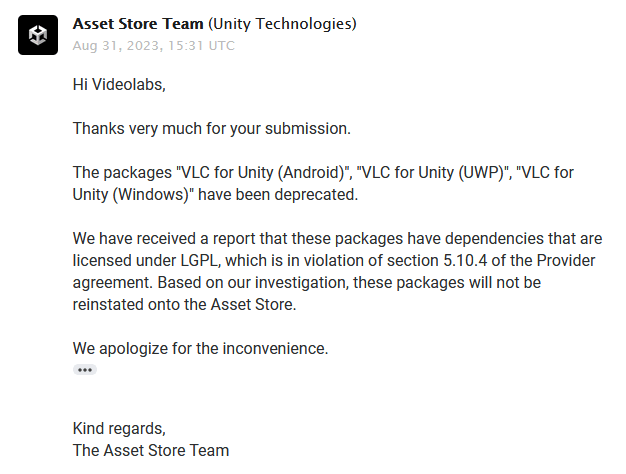
<p align="center">
    <img src="/assets/unity-store-email.png" />
</p>

<p>And just like this, our <a href="https://assetstore.unity.com/publishers/39987">publisher account was instantly banned</a>.</p>

<p>After <em>months</em> of slow back-and-forth over email trying to find a compromise, including offering to exclude LGPL code from the assets, Unity basically told us we were not welcome back to their Store, ever. <em>Even if we were to remove all LGPL code from the Unity package</em>.</p>

<p>Where it gets fun is that there are currently hundreds if not thousands of Unity assets that include LGPL dependencies (such as FFmpeg) in the Store <strong>right now</strong>. Enforcement is seemingly totally random, unless you get reported by someone, apparently.</p>

<p>It gets better… Unity itself, both the Editor and the runtime (which means <em>your shipped game</em>) <strong>is already using LGPL dependencies</strong>! Unity is built on libraries such as Lame, libiconv, libwebsockets and websockify.js (at least). Full list of open-source Unity dependencies <a href="https://gist.github.com/mfkl/ad5cbeadf144e52a762a09fac6a05a70">here</a>.</p>

<p>So Unity gets to use and benefit from LGPL open-source libraries, games built with Unity depend on LGPL code by default (hello glibc!), but publishers and Unity users are not allowed to do so through the Unity Store?</p>

<h1 id="introducing-the-videolabs-store">Introducing the <a href="https://videolabs.io/store">Videolabs Store</a></h1>

<p align="center">
    <a href="https://videolabs.io/store"><img src="/assets/vlabs-store-1.png" /></a>
</p>

<p>If you are a company requiring multimedia products or consulting for your own projects, this store will be of interest to you.</p>

<p>After our assets got removed, previous and new customers started emailing us about the status of VLC for Unity. Are we going to keep maintaining the assets? How to get build updates? etc.</p>

<p>Numerous companies make use of the LibVLC SDK and other related technologies (like FFmpeg).</p>

<p>For this reason, we decided to publish a simple Store on the <a href="https://videolabs.io">Videolabs</a> website.</p>

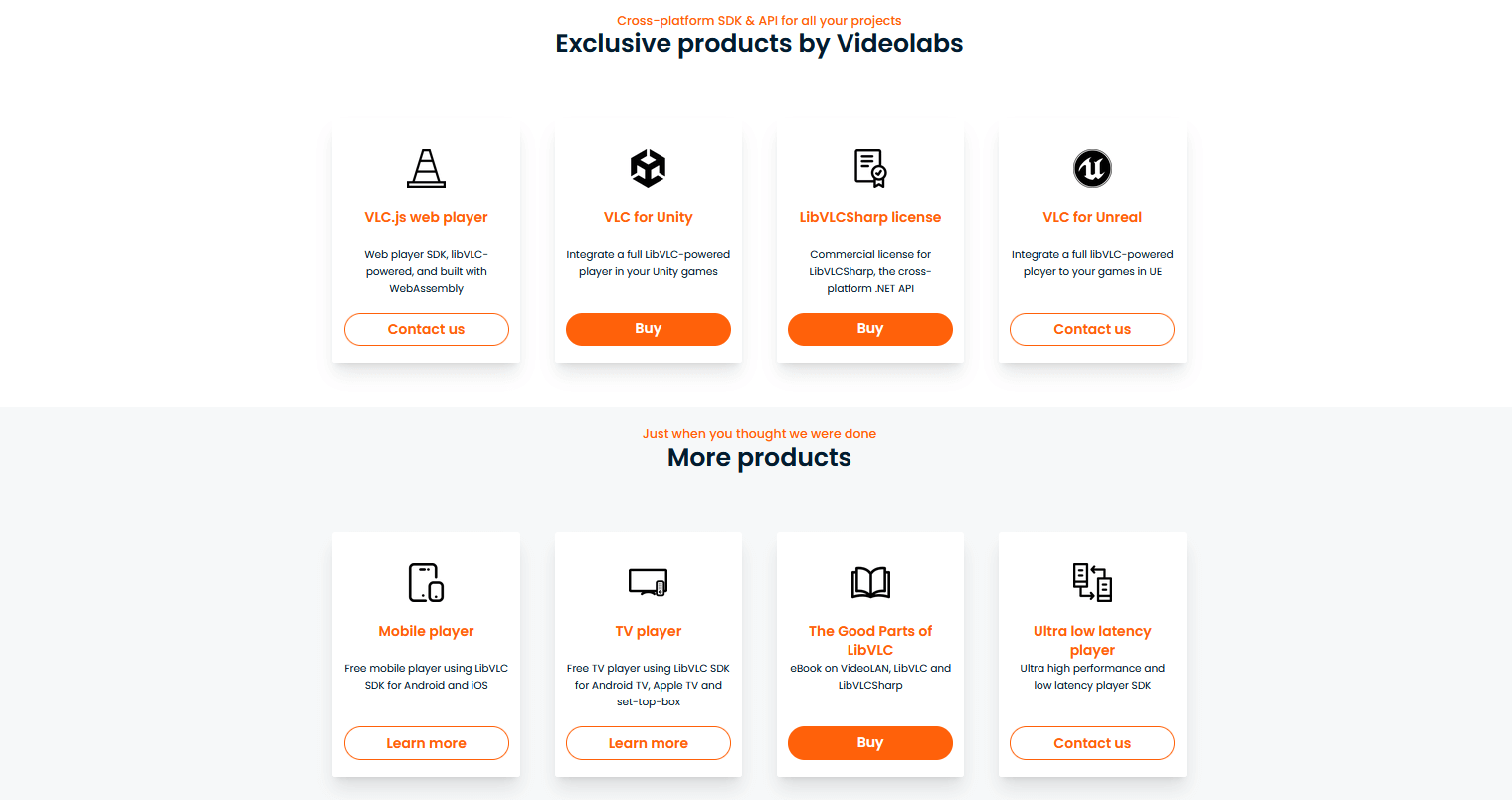
<p>This way, existing and new customers can still <a href="https://videolabs.io/store/unity">purchase the binaries for the open-source VLC Unity plugin</a> without our presence on the Unity Store. Of course, users can still build VLC for Unity themselves, as it is open source.</p>

<h3 id="flexible-multimedia-consulting-packages">Flexible multimedia consulting packages</h3>

<p>Sometimes users will run into issues or request a new feature and while the community can sometimes help, the limited time of a few volunteers only goes so far. I have written about <a href="https://mfkl.github.io/2020/10/25/OSS-sutainability.html">OSS sustainability before</a> and that is very much on topic here.</p>

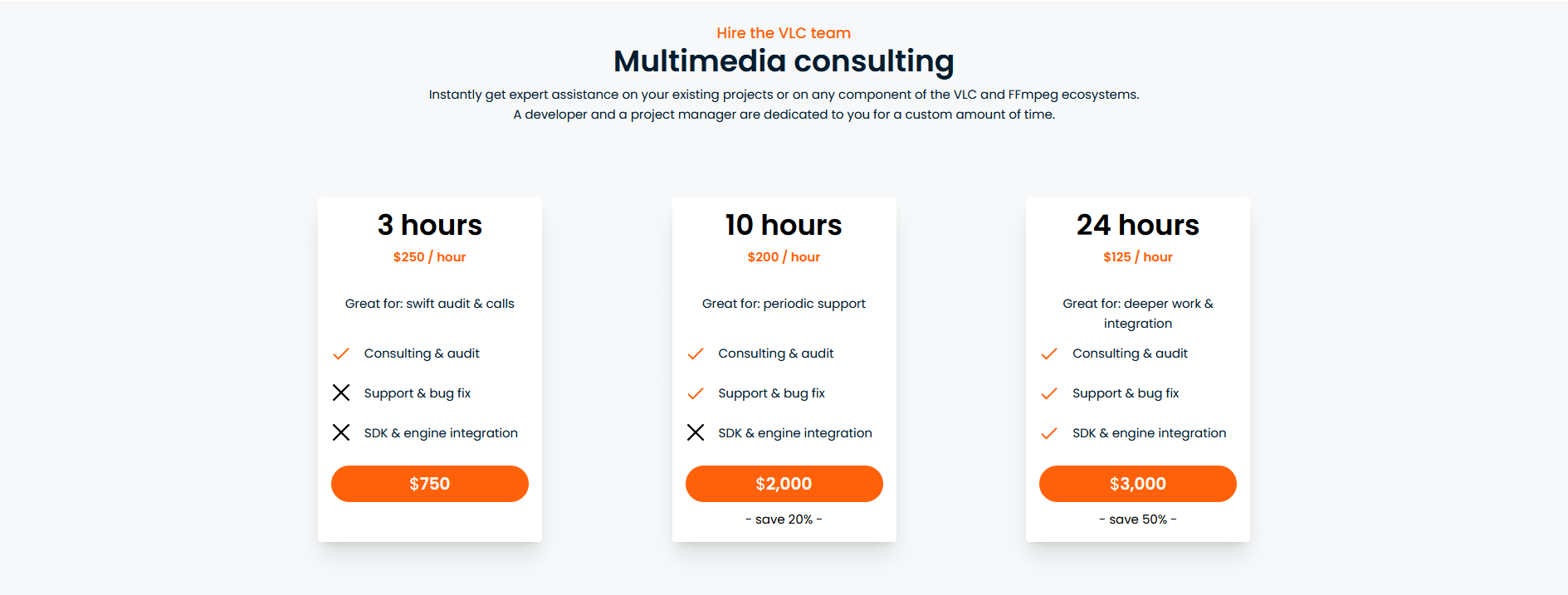
<p>It is in the best interest of both open-source project maintainers and commercial consumers to have a clear products and services offering for a given project, and that is what we have created with the <a href="https://videolabs.io/store">Videolabs Store</a> for both LibVLC and FFmpeg.</p>

<p>The Videolabs team is composed of VLC and FFmpeg experts in most protocols, formats and platforms.</p>

<p>If you are using or planning to use LibVLC or FFmpeg in your project and need help, whether it be custom builds, bug fixes, SDK integration or simply answers to your questions for your specific needs, these packages are for you!</p>

<p align="center">
    <a href="https://videolabs.io/store"><img src="/assets/vlabs-store-2.png" /></a>
</p>

<p>We have created 3 multimedia consulting packages: 3 hours, 10 hours and 24 hours. They can be purchased for a one-time service or a monthly subscription.</p>

<p>No matter which OS platform or toolkit you are building with, we can help.</p>

<h3 id="other-products">Other products</h3>

<p>The <a href="https://videolabs.io/store/libvlcsharp/">LibVLCSharp commercial license</a> and the <a href="https://mfkl.gumroad.com/l/libvlc-good-parts">LibVLC ebook</a> can also be found in the <a href="https://videolabs.io/store">Videolabs Store</a>, as well as other upcoming products such as Kyber, our new ultra low latency game/desktop streaming and remote control SDK, and more game engine integration such as Unreal.</p>

<p align="center">
    <a href="https://videolabs.io/store"><img src="/assets/vlabs-store-3.png" /></a>
</p>]]></content><author><name>Martin Finkel</name></author><summary type="html"><![CDATA[VLC for Unity integration]]></summary></entry><entry><title type="html">Milestone: 2 million downloads for VideoLAN .NET NuGet packages</title><link href="https://mfkl.github.io/2023/07/10/two-million-downloads.html" rel="alternate" type="text/html" title="Milestone: 2 million downloads for VideoLAN .NET NuGet packages" /><published>2023-07-10T04:10:40+00:00</published><updated>2023-07-10T04:10:40+00:00</updated><id>https://mfkl.github.io/2023/07/10/two-million-downloads</id><content type="html" xml:base="https://mfkl.github.io/2023/07/10/two-million-downloads.html"><![CDATA[<p><a href="https://www.nuget.org/profiles/videolan">The NuGet VideoLAN account</a> just reached <strong>2 million downloads</strong> in the .NET ecosystem.</p>

<p align="center">
    <img src="/assets/2-million.png" />
</p>

<p>As we reach this new arbitrary milestone, I’d like to reflect on the current LibVLC ecosystem developments and what is coming next for our users.</p>

<h1 id="libvlc-4-support">LibVLC 4 support</h1>

<p>We are working hard towards the support of LibVLC 4 in LibVLCSharp. This includes surfacing new native APIs and modifying existing ones, while keeping in mind ease of use and .NET conventions for a seamless developer experience across all supported platforms.</p>

<p>We also work closely with core VLC developers to provide feedback and help shape the upcoming LibVLC APIs that will enable new capabilities for your applications. A couple of examples of new exciting LibVLC 4 APIs (already/eventually available in all programming languages through LibVLC bindings) include:</p>

<ul>
  <li>A new mediaplayer recording API</li>
</ul>

<div class="language-c highlighter-rouge"><div class="highlight"><pre class="highlight"><code><span class="cm">/**
 * Start/stop recording
 *
 * \note The user should listen to the libvlc_MediaPlayerRecordChanged event,
 * to monitor the recording state.
 *
 * \version LibVLC 4.0.0 and later.
 *
 * \param p_mi media player
 * \param enable true to start recording, false to stop
 * \param dir_path path of the recording directory or NULL (use default path),
 * has only an effect when first enabling recording.
 */</span>
<span class="n">LIBVLC_API</span> <span class="kt">void</span> <span class="nf">libvlc_media_player_record</span><span class="p">(</span> <span class="n">libvlc_media_player_t</span> <span class="o">*</span><span class="n">p_mi</span><span class="p">,</span> 
                                            <span class="n">bool</span> <span class="n">enable</span><span class="p">,</span> <span class="k">const</span> <span class="kt">char</span> <span class="o">*</span><span class="n">dir_path</span><span class="p">);</span>
</code></pre></div></div>

<ul>
  <li>A new advanced mediaplayer custom video rendering GPU API.</li>
</ul>

<p>This rather complex LibVLC API allows consumers to handle the hardware accelerated rendering themselves, instead of pointing LibVLC to a Window handle. Performant game engine integration, such as Unity3D and Unreal, is one of the key use cases of this new LibVLC 4.0 API.</p>

<div class="language-c highlighter-rouge"><div class="highlight"><pre class="highlight"><code><span class="cm">/**
 * Set callbacks and data to render decoded video to a custom texture
 *
 * \warning VLC will perform video rendering in its own thread and at its own rate,
 * You need to provide your own synchronisation mechanism.
 *
 * \param mp the media player
 * \param engine the GPU engine to use
 * \param setup_cb callback called to initialize user data
 * \param cleanup_cb callback called to clean up user data
 * \param resize_cb callback to set the resize callback
 * \param update_output_cb callback to get the rendering format of the host (cannot be NULL)
 * \param swap_cb callback called after rendering a video frame (cannot be NULL)
 * \param makeCurrent_cb callback called to enter/leave the rendering context (cannot be NULL)
 * \param getProcAddress_cb opengl function loading callback (cannot be NULL for \ref libvlc_video_engine_opengl and for \ref libvlc_video_engine_gles2)
 * \param metadata_cb callback to provide frame metadata (D3D11 only)
 * \param select_plane_cb callback to select different D3D11 rendering targets
 * \param opaque private pointer passed to callbacks
 *
 * \note the \p setup_cb and \p cleanup_cb may be called more than once per
 * playback.
 *
 * \retval true engine selected and callbacks set
 * \retval false engine type unknown, callbacks not set
 * \version LibVLC 4.0.0 or later
 */</span>
<span class="n">LIBVLC_API</span>
<span class="n">bool</span> <span class="nf">libvlc_video_set_output_callbacks</span><span class="p">(</span> <span class="n">libvlc_media_player_t</span> <span class="o">*</span><span class="n">mp</span><span class="p">,</span>
                                        <span class="n">libvlc_video_engine_t</span> <span class="n">engine</span><span class="p">,</span>
                                        <span class="n">libvlc_video_output_setup_cb</span> <span class="n">setup_cb</span><span class="p">,</span>
                                        <span class="n">libvlc_video_output_cleanup_cb</span> <span class="n">cleanup_cb</span><span class="p">,</span>
                                        <span class="n">libvlc_video_output_set_window_cb</span> <span class="n">window_cb</span><span class="p">,</span>
                                        <span class="n">libvlc_video_update_output_cb</span> <span class="n">update_output_cb</span><span class="p">,</span>
                                        <span class="n">libvlc_video_swap_cb</span> <span class="n">swap_cb</span><span class="p">,</span>
                                        <span class="n">libvlc_video_makeCurrent_cb</span> <span class="n">makeCurrent_cb</span><span class="p">,</span>
                                        <span class="n">libvlc_video_getProcAddress_cb</span> <span class="n">getProcAddress_cb</span><span class="p">,</span>
                                        <span class="n">libvlc_video_frameMetadata_cb</span> <span class="n">metadata_cb</span><span class="p">,</span>
                                        <span class="n">libvlc_video_output_select_plane_cb</span> <span class="n">select_plane_cb</span><span class="p">,</span>
                                        <span class="kt">void</span><span class="o">*</span> <span class="n">opaque</span> <span class="p">);</span>
</code></pre></div></div>

<blockquote>
  <p>The version 4 of LibVLC is still in development, so the API is not frozen yet, but the core functionality is already quite stable and used by many clients on all platforms, as well as the Unity integrations.</p>
</blockquote>

<h2 id="unity">Unity</h2>

<p>We recently shipped support for the <a href="https://mfkl.github.io/2023/04/17/unity-uwp.html">UWP platform in VLC Unity</a>, enabling the use of LibVLCSharp and LibVLC in Microsoft HoloLens devices, desktop and Xbox platforms, in addition to the existing <a href="https://videolabs.io/store/unity">Android</a> and <a href="https://videolabs.io/store/unity">Windows</a> classic targets.</p>

<p>As we are finalizing support for VLC Unity on iOS and macOS, we will then focus on general developer experience improvements as well as documentation efforts to solidify the Unity integration.</p>

<p>The feedback we have received so far is great: the video decoding performance is unmatched and VLC Unity is one of the most capable and advanced media player asset currently available on the Videolabs Store in terms of features.</p>

<h2 id="uno-platform">Uno Platform</h2>

<p>While we initially released a <a href="https://platform.uno/blog/vlc-windows-lamp-now-supported-uno-platform">LibVLCSharp / Uno integration</a> back in 2019, it has not been updated for a while to keep up with the latest Uno releases and accompanying API changes.</p>

<p>This may all change soon, now that <a href="https://platform.uno/blog/new-release-media-player-element-on-mobile-web-linux-webview2-support">Uno decided to use LibVLC for their Linux mediaplayer support</a>.</p>

<p>We are looking forward to work together to improve the developer experience for .NET developers in the multimedia space across all platforms that Uno and VLC support.</p>

<h2 id="commercial-licensing-and-consulting-offering">Commercial licensing and consulting offering</h2>

<p>Exactly 2 years ago, we introduced the <a href="https://videolabs.io/store/libvlcsharp">LibVLCSharp Commercial License</a> in an effort to secure the long term maintenance of the project. I firmly believe companies should be put to contribution when it comes to opensource sustainability, not individuals, and I have written <a href="https://mfkl.github.io/2020/10/25/OSS-sutainability.html">about this topic before</a>.</p>

<p>If your company relies on LibVLCSharp for their commercial products, we encourage you to support the project and help secure the long term maintenance by <a href="https://videolabs.io/store/libvlcsharp">purchasing a commercial license today</a>.</p>

<p>For more general multimedia needs, such as consulting, training, specific LibVLC / FFMPEG features or bug fixes, or even new platforms support, <a href="https://videolabs.io">Videolabs</a> is the partner of choice with experts on all platforms.</p>

<h1 id="libvlc-community-update">LibVLC community update</h1>

<h2 id="libvlc-discord-server">LibVLC Discord server</h2>

<p>Almost 3 years ago, we created the <a href="https://discord.gg/3h3K3JF">LibVLC Discord Server</a> to foster the LibVLC community with both LibVLC users and bindings maintainers, <strong>for all 12 supported programming languages</strong>.</p>

<p>The Discord server has grown steadily to <strong>1200+ members</strong> and it is a place where LibVLC users can get support from other members of the LibVLC community. Bindings maintainers also help each others out at times.</p>

<p>When someone has a cool use case or sample they want to share with the community, they can post in the <em>showcase</em> channel on the LibVLC Discord. For example, that is how I learned about the existence of the <a href="https://github.com/MinecraftMediaLibrary/EzMediaCore">VLC support in Minecraft</a>, using the awesome <a href="https://github.com/caprica/vlcj">VLCJ bindings</a> from <a href="https://github.com/caprica">Caprica</a>.</p>

<p align="center">
    <video width="640" height="360" src="https://user-images.githubusercontent.com/40838203/132433665-a675fc35-e31f-4044-a960-ce46a8fb7df5.mp4" controls="controls">
    </video>
</p>

<h2 id="zig">Zig</h2>

<p>The latest cool kid on the block, <a href="https://ziglang.org">ziglang</a>, made an appearance in the VLC community with <a href="https://github.com/kassane/libvlc-zig">libvlc-zig</a> which allows Zig developers to enjoy a compelling developer experience while using LibVLC and Zig. We are looking forward to see the apps you build with Zig and LibVLC!</p>

<p>While <a href="https://github.com/kassane/libvlc-zig">libvlc-zig</a> focuses on the LibVLC API, it is also possible to use Zig to build native VLC plugins using the lower level VLC API, such as this <a href="https://github.com/lachie/vlc-mixer">vlc-mixer example</a>.</p>

<p>Stay tuned.</p>]]></content><author><name>Martin Finkel</name></author><summary type="html"><![CDATA[The NuGet VideoLAN account just reached 2 million downloads in the .NET ecosystem.]]></summary></entry><entry><title type="html">Introducing VLC for Unity - UWP Edition</title><link href="https://mfkl.github.io/2023/04/17/unity-uwp.html" rel="alternate" type="text/html" title="Introducing VLC for Unity - UWP Edition" /><published>2023-04-17T04:10:40+00:00</published><updated>2023-04-17T04:10:40+00:00</updated><id>https://mfkl.github.io/2023/04/17/unity-uwp</id><content type="html" xml:base="https://mfkl.github.io/2023/04/17/unity-uwp.html"><![CDATA[<p>Today, we are announcing the initial release of <a href="https://videolabs.io/store/unity">VLC for Unity (UWP)</a> on the Videolabs Store!</p>

<p>This Unity plugin allows you to use a LibVLC-powered video player in your Unity-based UWP apps and games. Whether you need to support a rare video format, live streaming, HLS, RTSP or play a 4K video in your latest production, we got you covered. Feel free to <a href="https://videolabs.io/solutions/vlc-unity-trial.unitypackage">give it a try</a>!</p>

<h2 id="all-libvlc-features-available-in-your-unity-game">All LibVLC features available in your Unity game</h2>

<p>Given that this plugin is using <a href="https://code.videolan.org/videolan/LibVLCSharp">LibVLCSharp</a> (which uses LibVLC), it exposes more or less the <a href="https://code.videolan.org/videolan/LibVLCSharp#features">same feature set</a> and same codecs support than VLC, such as:</p>

<ul>
  <li>Play every media file formats, every codec and every streaming protocols</li>
  <li>Run on every platform, from desktop (Windows, Linux, Mac) to mobile (Android, iOS) and TVs</li>
  <li>Hardware and efficient decoding on every platform, up to 8K</li>
  <li>Network browsing for distant filesystems (SMB, FTP, SFTP, NFS…) and servers (UPnP, DLNA)</li>
  <li>Playback of Audio CD, DVD and Bluray with menu navigation</li>
  <li>Support for HDR, including tonemapping for SDR streams</li>
  <li>Audio passthrough with SPDIF and HDMI, including for Audio HD codecs, like DD+, TrueHD or DTS-HD</li>
  <li>Support for video and audio filters</li>
  <li>Support for 360 video and 3D audio playback, including Ambisonics</li>
  <li>Able to cast and stream to distant renderers, like Chromecast and UPnP renderers.</li>
</ul>

<p>And more!</p>

<h2 id="hardware-accelerated-video-playback-in-your-uwp-unity-apps-and-games">Hardware-accelerated video playback in your UWP Unity apps and games</h2>

<p>The 4.0 development version of LibVLC provides a powerful API which allows to perform custom rendering yet retaining hardware accelerated decoding.</p>

<p>In the context of Unity, this means using VLC for Unity allows you to use video frames as GPU textures in your Unity games. For UWP, this solution is based on Direct3D11.</p>

<p>This is as simple to use for you as writing</p>

<div class="language-csharp highlighter-rouge"><div class="highlight"><pre class="highlight"><code><span class="n">MediaPlayer</span><span class="p">.</span><span class="nf">GetTexture</span><span class="p">(</span><span class="k">out</span> <span class="n">texture</span><span class="p">);</span>
</code></pre></div></div>

<p>and uploading it to Unity for post-processing in your game scene.</p>

<p>The CPU architectures supported on UWP by VLC Unity are as follows:</p>

<ul>
  <li><strong>arm64-v8a</strong>,</li>
  <li><strong>x86_64</strong>.</li>
</ul>

<p><em>Xbox and Hololens devices</em>, in addition to regular Windows 10/11 desktop devices are therefore supported. This is the 3rd platform supported by VLC for Unity, in addition to <a href="https://videolabs.io/store/unity">Windows Classic</a> and <a href="https://videolabs.io/store/unity">Android</a>.</p>

<p>Feel free to let me know what you think on <a href="https://twitter.com/martz2804">Twitter</a>.</p>

<h4 id="download-the-free-trial-version"><a href="https://videolabs.io/solutions">Download the Free Trial version</a></h4>]]></content><author><name>Martin Finkel</name></author><summary type="html"><![CDATA[Today, we are announcing the initial release of VLC for Unity (UWP) on the Videolabs Store!]]></summary></entry><entry><title type="html">Introducing LibVLCSharp for WinUI</title><link href="https://mfkl.github.io/2023/04/04/introducing-libvlcsharp-for-winui.html" rel="alternate" type="text/html" title="Introducing LibVLCSharp for WinUI" /><published>2023-04-04T04:10:40+00:00</published><updated>2023-04-04T04:10:40+00:00</updated><id>https://mfkl.github.io/2023/04/04/introducing-libvlcsharp-for-winui</id><content type="html" xml:base="https://mfkl.github.io/2023/04/04/introducing-libvlcsharp-for-winui.html"><![CDATA[<h3 id="today-we-are-announcing-the-initial-release-of-libvlcsharp-for-winui-on-nuget">Today, we are announcing the initial release of LibVLCSharp for WinUI on <a href="https://www.nuget.org/profiles/videolan">NuGet</a></h3>
<p><br /></p>
<p align="center">
    <img src="/assets/logo-winui.png" />
</p>

<h1 id="winui">WinUI</h1>

<p>LibVLCSharp has had support for the Universal Windows Platform (UWP) since the early days. Before LibVLCSharp, the work to integrate LibVLC with the UWP platform and make the LibVLC engine work well on it, was pioneered by the now defunct <a href="https://code.videolan.org/videolan/vlc-winrt">VLC for WinRT project</a>.</p>

<p>WinUI is the next evolution of the modern UI toolkit for the Windows desktop after UWP (unfortunately, the Xbox target is not supported with WinUI).</p>

<p>As of <strong>LibVLCSharp version 3.7.0</strong>, building multimedia apps using <strong>WinUI 3</strong> is now supported with LibVLC. Expect the usual goodies such as default hardware decoding enabled.</p>

<p>Both <em>Packaged</em> and <em>Unpackaged</em> WinUI apps are supported with LibVLCSharp.</p>

<p>There are several important caveats and changes from the previous UWP LibVLCSharp support that I will detail below, for users migrating or supporting both UWP and WinUI.</p>

<h2 id="api-breaking-change-for-existing-uwp-users">API Breaking change for existing UWP users</h2>

<p>When upgrading to LibVLCSharp version 3.7.0, users currently targeting UWP will need to address a build failure as there was a needed namespace change.</p>

<p>In your XAML files:</p>

<div class="language-diff highlighter-rouge"><div class="highlight"><pre class="highlight"><code><span class="gd">-xmlns:lvs="using:LibVLCSharp.Platforms.UWP"
</span><span class="gi">+xmlns:lvs="using:LibVLCSharp.Platforms.Windows"
</span></code></pre></div></div>

<p>In your C# files:</p>
<div class="language-diff highlighter-rouge"><div class="highlight"><pre class="highlight"><code><span class="gd">-using LibVLCSharp.Platforms.UWP;
</span><span class="gi">+using LibVLCSharp.Platforms.Windows;
</span></code></pre></div></div>

<p>This should be quick and as painless as possible to fix as you upgrade to LibVLCSharp 3.7.0 in your UWP applications. The minor version of LibVLCSharp is bumped according to our documented <a href="https://code.videolan.org/videolan/LibVLCSharp/-/blob/master/docs/versioning.md">versioning strategy</a>.</p>

<h2 id="libvlc-build-type">LibVLC build type</h2>

<p>With UWP apps using LibVLCSharp, the user needs to add a special, custom-built LibVLC variant, the <a href="https://www.nuget.org/packages/VideoLAN.LibVLC.UWP">VideoLAN.LibVLC.UWP
</a> nuget package. This has always been the case and is due to the expectation of the underlying runtime of the UWP platform.</p>

<p>For WinUI targets, the classic Windows LibVLC build, <a href="https://www.nuget.org/packages/VideoLAN.LibVLC.Windows">VideoLAN.LibVLC.Windows</a>, <strong>must</strong> be used and only from version 3.0.18 minimum. Using a UWP LibVLC build will not work. As always, starting from the <a href="https://code.videolan.org/videolan/LibVLCSharp/-/tree/3.x/samples/LibVLCSharp.WinUI.Sample">official sample app</a> is a good idea.</p>

<h2 id="minimum-target-framework-version">Minimum Target Framework Version</h2>

<p>The minimal WinUI TFM supported version is <code class="language-plaintext highlighter-rouge">net6.0-windows10.0.17763.0</code>. Do make sure you target it for your WinUI project (or anything above).</p>

<hr />

<p>As we release this initial support of WinUI on NuGet, please make sure to tell us if you encounter any issue and what apps you build with LibVLCSharp for WinUI!</p>]]></content><author><name>Martin Finkel</name></author><summary type="html"><![CDATA[Today, we are announcing the initial release of LibVLCSharp for WinUI on NuGet]]></summary></entry><entry><title type="html">The Good Parts of LibVLC (ebook)</title><link href="https://mfkl.github.io/2022/09/12/libvlc-good-parts.html" rel="alternate" type="text/html" title="The Good Parts of LibVLC (ebook)" /><published>2022-09-12T04:10:40+00:00</published><updated>2022-09-12T04:10:40+00:00</updated><id>https://mfkl.github.io/2022/09/12/libvlc-good-parts</id><content type="html" xml:base="https://mfkl.github.io/2022/09/12/libvlc-good-parts.html"><![CDATA[<p>I am proud to announce that my new book on LibVLC is now <a href="https://mfkl.gumroad.com/l/libvlc-good-parts">available</a>!</p>

<p align="center">
  <a href="https://mfkl.gumroad.com/l/libvlc-good-parts">
    <img src="/assets/ebook.jpg" />
  </a>
</p>

<p><a href="https://mfkl.gumroad.com/l/libvlc-good-parts">This book</a> is the first book ever about <strong>LibVLC and the VideoLAN community</strong>.</p>

<p>VLC reached <strong>3 billion downloads</strong> in 2019. While there is a lot of information out there on VLC and VideoLAN, it is quite spread out across various sources. With all the podcasts, press releases, wikis, forum posts, git repositories and blog posts from community members, I felt that a longer form of content, such as this book, would be welcome to <strong>synthesize all this information into one place and provide context around the amazing VLC community</strong>.</p>

<p>Although the VLC app is well known and popular, the accompanying library SDK for developers, <strong>LibVLC</strong>, remains largely unknown to many developers. This technical book serves as a way to raise awareness of this great multimedia framework as <strong>a viable option for developers</strong>, as well as a detailed example of what an ethical opensource project looks like.</p>

<p>Since I personally built and used the <strong>LibVLC library</strong> on most platforms during the past 5+ years, and helped polish the developer experience of the library on all platforms through <strong>LibVLCSharp</strong>, I managed to get a pretty nice overview of the LibVLC landscape.</p>

<p><strong>I have put everything I know about LibVLC, VLC and VideoLAN in this book.</strong></p>

<p>We will dive into the internals of the native library in Part 2, and the focus will shift to the LibVLC usage, its public API interfaces, features and capabilities (in Parts 3 and 4) through <strong>LibVLCSharp (.NET bindings for LibVLC)</strong>.</p>

<p>By the end of this book, you will know everything you need to build your own video/audio player app using LibVLC, for any target platform using any programming language.</p>

<h2 id="what-is-the-target-developer-audience-for-this-book">What is the target developer audience for this book?</h2>

<p>All kinds. Beginner to senior, all programming languages.</p>

<p>Everyone will learn something. I have tried to keep things approachable while not shying away from the deeply technical topics that needed to be covered. This was sometimes a tricky balancing act. Most of the code in the book is C# with a bit of C, though the code snippets are succinct and fairly intuitive to read, no matter which programming language you fancy (LibVLC works with most of them).</p>

<p>You do not need to be knowledgeable in .NET/C# to read and understand the code in this book.</p>

<h2 id="is-this-book-good-for-beginners-in-multimedia-programming">Is this book good for beginners in multimedia programming?</h2>

<p>Yes. Most important multimedia concepts are explained from scratch when going through the LibVLC internals, so multimedia novices will be able to follow. As for the API usage sections, the ease of use of LibVLC being one of its assets, this should be an approachable read for beginners in the multimedia programming space.</p>

<p>Happy reading!</p>]]></content><author><name>Martin Finkel</name></author><summary type="html"><![CDATA[I am proud to announce that my new book on LibVLC is now available!]]></summary></entry></feed>